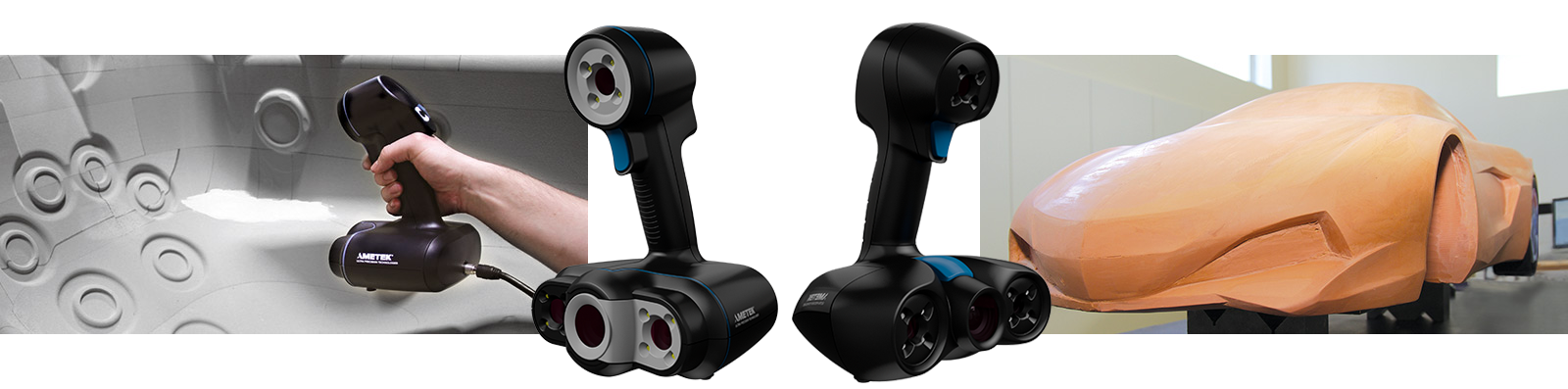
[et_pb_section fb_built=”1″ admin_label=”section” _builder_version=”4.16″ global_colors_info=”{}”][et_pb_row admin_label=”row” _builder_version=”4.16″ background_size=”initial” background_position=”top_left” background_repeat=”repeat” global_colors_info=”{}”][et_pb_column type=”4_4″ _builder_version=”4.16″ custom_padding=”|||” global_colors_info=”{}” custom_padding__hover=”|||”][et_pb_image src=”https://facilities.create.aau.dk/wp-content/uploads/header3dscan.png” align_tablet=”center” align_phone=”center” align_last_edited=”on|desktop” _builder_version=”4.16″ animation_style=”slide” animation_direction=”left” animation_duration=”500ms” animation_intensity_slide=”10%” use_border_color=”off” border_color=”#ffffff” border_style=”solid” animation=”left” sticky=”off” always_center_on_mobile=”on” global_colors_info=”{}”][/et_pb_image][et_pb_tabs _builder_version=”4.16″ background_size=”initial” background_position=”top_left” background_repeat=”repeat” use_border_color=”off” border_color=”#ffffff” border_style=”solid” global_colors_info=”{}”][et_pb_tab title=”Trusimplicity” _builder_version=”4.16″ body_font=”||||” body_line_height=”2em” tab_font=”||||” tab_line_height=”2em” background_size=”initial” background_position=”top_left” background_repeat=”repeat” body_line_height_tablet=”2em” body_line_height_phone=”2em” tab_line_height_tablet=”2em” tab_line_height_phone=”2em” global_colors_info=”{}”]
- Hybrid positioning: uses the parts’ natural geometry and color.
- Point-and-shoot: no need to prepare parts. Just go!
- User-friendly: no experience required, up-and-running in minutes.
- Scan in color: allows for seamless capture of high-quality geometry and colors simultaneously.
- Real-time visualization: look at the computer screen to see what you are doing and what is left to be done.
[/et_pb_tab][et_pb_tab title=”Truportability” _builder_version=”4.16″ body_font=”||||” body_line_height=”2em” tab_font=”||||” tab_line_height=”2em” background_size=”initial” background_position=”top_left” background_repeat=”repeat” body_line_height_tablet=”2em” body_line_height_phone=”2em” tab_line_height_tablet=”2em” tab_line_height_phone=”2em” global_colors_info=”{}”]
- Stand-alone device: the part is the reference, no external positioning system needed.
- On-the-go scanning: fits into a carry-on case, so you can use it both in-house or on site.
- Lightweight and small: weighs under 1 kg (2.2 lb.), can reach confined areas. Fits into a carry-on.
[/et_pb_tab][et_pb_tab title=”Speed” _builder_version=”4.16″ body_font=”||||” body_line_height=”2em” tab_font=”||||” tab_line_height=”2em” background_size=”initial” background_position=”top_left” background_repeat=”repeat” body_line_height_tablet=”2em” body_line_height_phone=”2em” tab_line_height_tablet=”2em” tab_line_height_phone=”2em” global_colors_info=”{}”]
- Fast: typical objects are scanned in 5 minutes or less.
- High measurement rate: capture large amount of 3D data for faster scanning.
- Automatic mesh output: ready-to-use files (geometry and color), right as you complete acquisition.
- Quick workflow integration: usable scan files can be imported into RE/CAD/3D printing software without post-processing.
[/et_pb_tab][et_pb_tab title=”TrueAccuracy” _builder_version=”4.16″ body_font=”||||” body_line_height=”2em” tab_font=”||||” tab_line_height=”2em” background_size=”initial” background_position=”top_left” background_repeat=”repeat” body_line_height_tablet=”2em” body_line_height_phone=”2em” tab_line_height_tablet=”2em” tab_line_height_phone=”2em” global_colors_info=”{}”]
- Professionnal-grade measurements: accuracy of up to 0.1 mm (0.004 in.) and resolution of up to 0.1 mm (0.004 in.).
- Built-in intelligence: ensures that 3D data is high-quality and accurate.
- Optional targets: possible to use targets to compensate for an object’s lack of positioning information.
- No rigid setup required: both the part and the scanner can be moved during scanning.
[/et_pb_tab][/et_pb_tabs][/et_pb_column][/et_pb_row][et_pb_row column_structure=”1_4,1_4,1_4,1_4″ _builder_version=”4.16″ background_size=”initial” background_position=”top_left” background_repeat=”repeat” global_colors_info=”{}”][et_pb_column type=”1_4″ _builder_version=”4.16″ custom_padding=”|||” global_colors_info=”{}” custom_padding__hover=”|||”][et_pb_image src=”https://facilities.create.aau.dk/wp-content/uploads/easy-to-use.png” align=”center” align_tablet=”center” align_phone=”center” align_last_edited=”on|desktop” _builder_version=”4.16″ use_border_color=”off” border_color=”#ffffff” border_style=”solid” animation=”off” sticky=”off” always_center_on_mobile=”on” global_colors_info=”{}”][/et_pb_image][et_pb_text _builder_version=”4.16″ background_size=”initial” background_position=”top_left” background_repeat=”repeat” use_border_color=”off” border_color=”#ffffff” border_style=”solid” global_colors_info=”{}”]
Easy to Use
The Go!SCAN 3D scanners require no preparation or complex setup, are up-and-running within a few minutes, and even guide you through the scanning process.
[/et_pb_text][/et_pb_column][et_pb_column type=”1_4″ _builder_version=”4.16″ custom_padding=”|||” global_colors_info=”{}” custom_padding__hover=”|||”][et_pb_image src=”https://facilities.create.aau.dk/wp-content/uploads/fast-3d-scanning.png” align=”center” align_tablet=”center” align_phone=”center” align_last_edited=”on|desktop” _builder_version=”4.16″ use_border_color=”off” border_color=”#ffffff” border_style=”solid” animation=”off” sticky=”off” always_center_on_mobile=”on” global_colors_info=”{}”][/et_pb_image][et_pb_text _builder_version=”4.16″ background_size=”initial” background_position=”top_left” background_repeat=”repeat” use_border_color=”off” border_color=”#ffffff” border_style=”solid” global_colors_info=”{}”]
Fast 3D Scanning
Typical objects can be scanned in 5 minutes or less.
[/et_pb_text][/et_pb_column][et_pb_column type=”1_4″ _builder_version=”4.16″ custom_padding=”|||” global_colors_info=”{}” custom_padding__hover=”|||”][et_pb_image src=”https://facilities.create.aau.dk/wp-content/uploads/portable-lightweight-3d-scan.png” align=”center” align_tablet=”center” align_phone=”center” align_last_edited=”on|desktop” _builder_version=”4.16″ use_border_color=”off” border_color=”#ffffff” border_style=”solid” animation=”off” sticky=”off” always_center_on_mobile=”on” global_colors_info=”{}”][/et_pb_image][et_pb_text _builder_version=”4.16″ background_size=”initial” background_position=”top_left” background_repeat=”repeat” use_border_color=”off” border_color=”#ffffff” border_style=”solid” global_colors_info=”{}”]
Portable & Lightweight
Our 3D digitizers are handheld, feature an ergonomic design and weigh less than 1 kg. Bring them anywhere you want!
[/et_pb_text][/et_pb_column][et_pb_column type=”1_4″ _builder_version=”4.16″ custom_padding=”|||” global_colors_info=”{}” custom_padding__hover=”|||”][et_pb_image src=”https://facilities.create.aau.dk/wp-content/uploads/scan-color-icon.png” align=”center” align_tablet=”center” align_phone=”center” align_last_edited=”on|desktop” _builder_version=”4.16″ use_border_color=”off” border_color=”#ffffff” border_style=”solid” animation=”off” sticky=”off” always_center_on_mobile=”on” global_colors_info=”{}”][/et_pb_image][et_pb_text _builder_version=”4.16″ background_size=”initial” background_position=”top_left” background_repeat=”repeat” use_border_color=”off” border_color=”#ffffff” border_style=”solid” global_colors_info=”{}”]
Scan in Full Color
Objects will be reproduced with their entire original palette.
[/et_pb_text][/et_pb_column][/et_pb_row][et_pb_row _builder_version=”4.16″ background_size=”initial” background_position=”top_left” background_repeat=”repeat” global_colors_info=”{}”][et_pb_column type=”4_4″ _builder_version=”4.16″ custom_padding=”|||” global_colors_info=”{}” custom_padding__hover=”|||”][et_pb_video_slider show_image_overlay=”on” controls_color=”light” _builder_version=”4.16″ global_colors_info=”{}”][et_pb_video_slider_item admin_title=”Vase” src=”https://youtu.be/Rs0OwP13pKA” _builder_version=”3.0.47″ global_colors_info=”{}” show_image_overlay=”on”][/et_pb_video_slider_item][et_pb_video_slider_item admin_title=”CGoScan20″ src=”https://youtu.be/MbynoIMFe0Q” _builder_version=”3.0.47″ global_colors_info=”{}” show_image_overlay=”on”][/et_pb_video_slider_item][et_pb_video_slider_item admin_title=”GoScan Human Head” src=”https://youtu.be/fu8Ehyp-NEU” _builder_version=”3.0.47″ global_colors_info=”{}” show_image_overlay=”on”][/et_pb_video_slider_item][et_pb_video_slider_item admin_title=”Reverse Engineering” src=”https://youtu.be/n7AIYUMRXHI” _builder_version=”3.0.47″ global_colors_info=”{}” show_image_overlay=”on”][/et_pb_video_slider_item][/et_pb_video_slider][/et_pb_column][/et_pb_row][et_pb_row _builder_version=”4.16″ background_size=”initial” background_position=”top_left” background_repeat=”repeat” global_colors_info=”{}”][et_pb_column type=”4_4″ _builder_version=”4.16″ custom_padding=”|||” global_colors_info=”{}” custom_padding__hover=”|||”][et_pb_tabs _builder_version=”4.16″ background_size=”initial” background_position=”top_left” background_repeat=”repeat” use_border_color=”off” global_colors_info=”{}”][et_pb_tab title=”Students” _builder_version=”4.16″ body_font=”||||” body_line_height=”2em” tab_font=”||||” tab_line_height=”2em” body_line_height_tablet=”2em” body_line_height_phone=”2em” tab_line_height_tablet=”2em” tab_line_height_phone=”2em” global_colors_info=”{}”]
You can get help from us to scan objects as students.
Please come to the office 5.153 and inform is about you scan request.
Please note that the scanners are meant for short term use.
[/et_pb_tab][et_pb_tab title=”Staff” _builder_version=”4.16″ body_font=”||||” body_line_height=”2em” tab_font=”||||” tab_line_height=”2em” body_line_height_tablet=”2em” body_line_height_phone=”2em” tab_line_height_tablet=”2em” tab_line_height_phone=”2em” global_colors_info=”{}”]
If you have a project that requires 3D Scanning you can get help from us to perform the scan process.
If your project is a bigger task, we will teach you how to use the hardware/software so you can perform the task yourself.
Please note that the scanners are meant for short term use.
[/et_pb_tab][/et_pb_tabs][/et_pb_column][/et_pb_row][/et_pb_section]